Give Customers Free AI Visual Designs of Their Interior


Stop relying on customers imaginations to close jobs. Let visitors visualize their dream interior for free, and capture 3x more quote requests automatically.

Before & After AI Images For Interior Designers

Complete interior design projects

The Old Way

Static "Contact Us" Page

Submit (And Wait...)
BORING &
LOW CONVERSION
The New Way

AI Interior Design Visualiser (Interactive Before & After)

QUOTE >
Visitor Upload
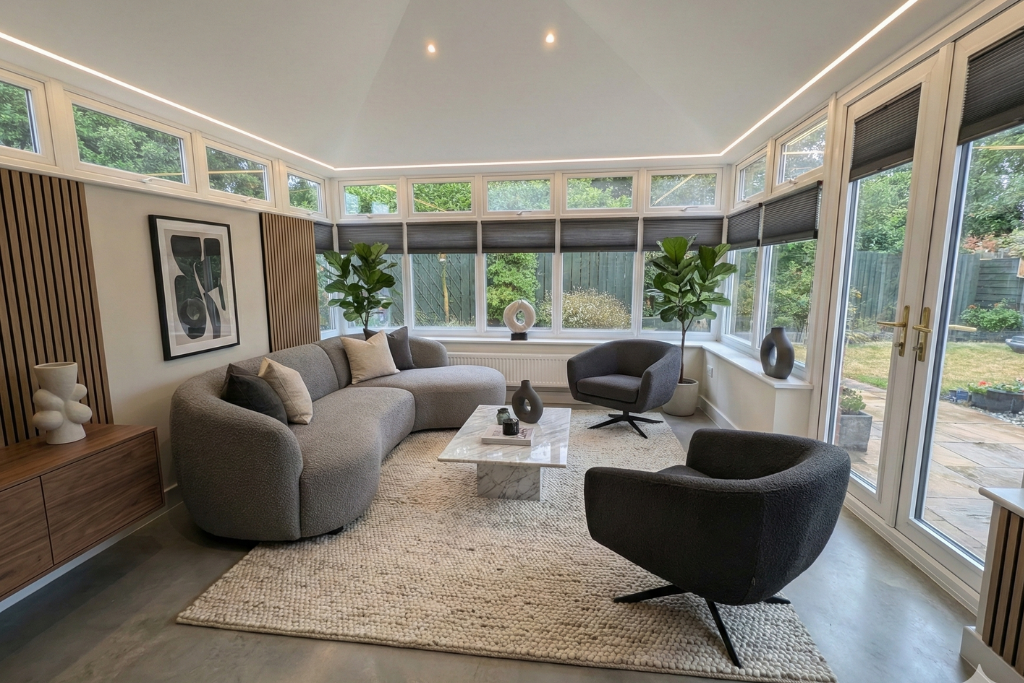
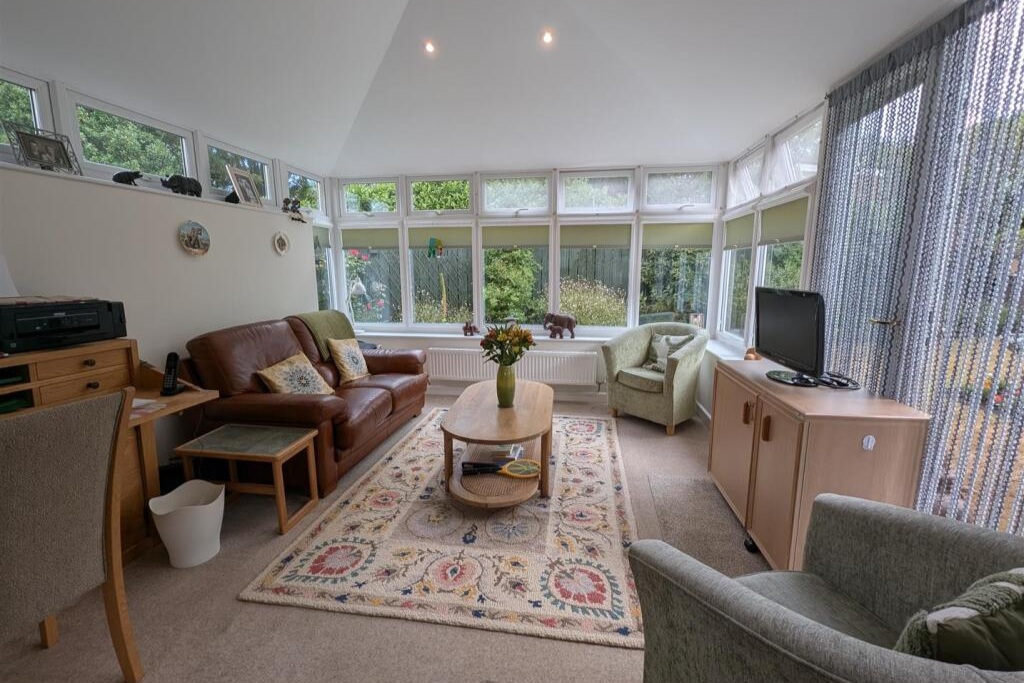
After: AI-generated interior design preview showing a refreshed room style with updated finishes and decor for client approval Before: visitor uploaded room photo used as input for the AI interior design visualiser

AI interior design visualiser for interior designers. Clients upload a photo of their room and instantly see an AI-generated before-and-after transformation preview. Interior designers use this to help clients choose a direction, shorten decision time, and improve conversion to paid consultations.

Examples include wall colour ideas, flooring and finish changes, furniture style direction, lighting mood, and overall room makeover concepts.

Works Seemlessly With Any Website

Before & After AI Images For Interior Designers

Custom Colours

Furniture

Art Placements

Carpets & Rugs

Complete Overhauls

Let your customers upload an image of their current interior. They’re then asked a series of customisable questions: Example flow: 1. Choose Your Preferred Style, 2. Choose Furniture Colours, 3. Choose Flooring, 4. Choose Decor Theme, 5. Choose Window Dressings. Within seconds of hitting the ‘Generate Now’ button, they see a realistic design, showing them exactly how their new interior will look.


Works for bedrooms, living rooms, kitchens, bathrooms, conservatories, garden rooms, dining rooms, hall ways, full homes and everywhere else.


Custom furniture, window dressings, rugs, carpets, flooring, orniments, wall art, you name it, See it Done can be configured to edit customers images to show it realistically. 

See it Done Allows Customers to

Automated Lead Nurturing

We Follow Up For You.

When a customer generates a design, our system automatically emails them the "Before & After" photos with your branding.

  • Instant Gratification: Customer gets their design immediately in their inbox.
  • Call-to-Action: The email includes a big "Get a Quote for this Look" button that links to your phone or calendar.
  • Sales Context: Your sales team sees exactly what the customer wants before they even call.
Y
Your Company Name

Here is the new design for your interior!

Start Converting More Customers

Give customers free AI renovations of their interiors in seconds

Free plans available, no credit card required.

AI for Interior Designers: Add AI-Powered Before-and-After Previews to Your Website

See it Done - The AI For Interior Designers

Elevate Your Interior Design Business with AI-Driven Visual Previews for Your Clients

As an interior designer, your job is to bring your clients’ visions to life. But how do you convey the potential of your designs to prospects before they commit? With SeeItDone, you can add AI-powered before-and-after previews directly to your website, offering clients a stunning, interactive experience. Whether they want to redesign their living room, kitchen, or office space, your clients can instantly see how their space will transform. This tool not only helps you engage clients but also positions you to sell higher-ticket projects and close deals faster.

Why Interior Designers Should Add AI to Their Website

Integrating SeeItDone’s AI-powered design tool into your website is an absolute game-changer. Here’s why you should offer before-and-after design previews to your clients:

1. Showcase Stunning Before-and-After Previews

With SeeItDone, you can provide your clients with realistic, high-quality before-and-after design previews. Whether they’re renovating a living room, transforming a kitchen, or reimagining an office space, your clients can see how their space will look after your design work is complete. This instant visualization not only helps them make decisions but also boosts their confidence in your ability to deliver stunning results.

2. Engage Clients and Close High-Ticket Jobs Faster

One of the most powerful ways to increase the value of your projects is to provide clear, visual evidence of your design capabilities. By offering before-and-after design images, you help clients envision how their space will look after your work. This makes it easier for them to commit to larger, higher-budget projects, such as full home makeovers or extensive commercial redesigns, giving you the opportunity to close bigger, more profitable deals.

3. Transform Your Website into an Interactive Portfolio

Instead of relying on traditional portfolios or static images, you can offer clients an interactive experience that allows them to visualize different design possibilities for their space. The AI tool provides before-and-after images, which show how a space will look after your design. This immersive tool keeps visitors engaged on your site longer, increasing the likelihood of conversion.

4. Differentiate Yourself from Competitors

In a crowded market, standing out is crucial. By offering an AI-driven design tool on your website, you demonstrate that you’re ahead of the curve, offering innovative services that competitors may not provide. Offering before-and-after visualizations sets you apart and helps you attract clients who are willing to pay a premium for a professional designer who can visualize their project clearly and confidently.

5. Set Clear Expectations and Reduce Misunderstandings

When it comes to design, misunderstandings about expectations are common. By showing your clients a realistic preview of how their space will look, you set clear expectations and reduce the chances of revisions or dissatisfaction with the final result. This leads to smoother project execution and more satisfied clients who are likely to refer you to others.

How SeeItDone Works for Interior Designers

Here’s how easy it is to integrate SeeItDone into your website and start offering AI-powered before-and-after previews to your clients:

  1. Easy Website Integration: Add the SeeItDone tool directly to your website with simple integration instructions, or collaborate with a developer to add it seamlessly.

  2. Client Customization: Clients upload a photo of their space and describe their desired changes—whether it’s furniture layouts, color schemes, flooring, or decor updates.

  3. Instant AI Previews: In just minutes, your clients can see realistic, AI-generated before-and-after images that show the transformation of their space based on their preferences.

  4. Client Collaboration: Clients can save, share, and request modifications to the design, allowing for collaboration and adjustments before you start working on the project.

Key Benefits of Adding SeeItDone to Your Interior Design Website

  • Increase Client Engagement: Keep visitors on your website longer by providing an interactive tool that allows them to visualize their dream designs.
  • Boost Conversion Rates: Offering before-and-after images helps clients visualize the final result, making them more likely to commit to your services.
  • Sell Higher-Ticket Jobs: Providing AI-driven previews gives you the opportunity to sell larger, more expensive projects, such as full home renovations or office redesigns.
  • Speed Up the Sales Process: Clients can visualize their desired design instantly, leading to faster decision-making and quicker conversions.
  • Improve Client Satisfaction: By setting clear expectations with realistic previews, you reduce the chances of misunderstandings and ensure clients are happy with the final result.
  • Custom Branding: The tool can be easily customized to match your website’s branding, providing a cohesive and professional experience for your clients.

AI for Interior Designers: Frequently Asked Questions

1. How can adding AI to my website help my interior design business?
By offering AI-powered before-and-after previews, you provide your clients with realistic visualizations that make it easier for them to envision their future space. This leads to faster decisions, higher engagement, and the ability to sell larger, more profitable projects.

2. What types of designs can SeeItDone visualize for interior designers?
SeeItDone can visualize a wide range of interior design elements, including furniture layouts, color schemes, flooring options, lighting changes, wall treatments, and more.

3. How quickly can I generate a preview for my clients?
Once your clients upload an image of their space and specify their desired changes, the AI-powered preview is available within minutes.

4. Can I customize the tool to match my branding?
Yes, the design tool can be fully customized to align with your website’s colors, fonts, and brand identity, ensuring a cohesive experience for your clients.

Get Started with AI for Interior Designers Today!

Upgrade your website and transform your interior design business by offering AI-powered before-and-after previews. By providing a modern, interactive experience, you’ll attract more clients, close more high-ticket projects, and set yourself apart from the competition.

See it Done AI For Landscapers

AI Visualizer For Landscape Gardeners

Landscape gardeners can now deliver stunning, AI-powered visual previews of garden designs to their clients. Whether it's redesigning a backyard, adding a new patio, or changing landscaping features, SeeItDone’s AI tool allows you to provide clear and accurate previews. Stand out in a competitive market by offering clients a glimpse of their dream garden before you start digging. The AI For Landscapers and Groundworks Companies.

See it Done AI for driveway installers

AI Visualizer For Driveway Installers

As a driveway installer, showcasing the transformation your service offers is key to attracting new customers. With SeeItDone’s AI-powered tool, you can provide clients with a realistic preview of how their new driveway will look before they commit. Whether it's resin-bound surfaces, block paving, or gravel, our AI tool generates accurate visualizations that help your clients make confident decisions. The AI For Driveway Installers.

See it Done for kitchen fitters and kitchen design

AI Visualizer For Kitchen Fitters

As a kitchen fitter, having the ability to show your clients exactly how their new kitchen will look before installation is a game-changer. SeeItDone’s AI-powered app lets you create accurate kitchen designs, from layouts to cabinet styles and color schemes. Delivering high-quality, realistic kitchen previews will increase client satisfaction and streamline the design process. The AI For Kitchen Fitters and Suppliers.

See it Done AI For rendering and house paint

AI Visualizer For Renderers

As a renderer, showing clients how your work will enhance the exterior of their homes is essential. With SeeItDone’s AI tool, you can generate stunning visual previews of how different rendering techniques (e.g., smooth, textured, or colored render) and even colours will look on their property. This helps clients see the value of your services and makes it easier to secure projects. The AI For Renderers.

See it Done - The AI For Bathroom Fitters

AI Visualizer For Bathroom Fitters

Bathroom fitters can now show clients exactly how their renovated space will look using See It Done’s AI tool. Whether it’s a sleek modern design or a classic style, our AI can create highly accurate bathroom visualizations. This makes it easier for clients to see their ideas in action and move forward with confidence. See it Done can be adapted to enable a product selection or style you have in stock. Giving accurate results for the types of bathrooms you actually sell. The AI For Bathroom Fitters

See it Done - The AI For Interior Designers

AI Visualizer For Interior Designers

Interior designers can now use SeeItDone’s AI tool to create hyper-realistic renderings of their design ideas. Whether it's choosing furniture layouts, color schemes, or wall finishes, this tool lets you show clients exactly how their space will look. With the power of AI, you can deliver compelling design previews that help clients make faster, more confident decisions. The AI For Interior Designers

See it Done - AI For Builders

AI Visualizer For Builders

General builders can now enhance their proposals with SeeItDone’s AI-powered visualization tool. By showing clients a preview of how their property will look after a new build, extension, or renovation, you make it easier for them to envision the final product. This visual approach leads to quicker decisions and higher project conversion rates. See it Done is perfect for before and after images of conservatories, extensions and outhouses. You can even upload a photo of a plot of land, describe the building you want to build, and the AI will show you the finished result. The AI For Builders

See it Done - AI For Loft Conversion Specialists

AI Visualizer For Loft Conversion Specialists

Loft conversion specialists can now use See It Done’s AI-powered tool to provide clients with a preview of how their loft space will be transformed. Whether adding a bedroom, office, or living space, your clients can see the potential of their loft with detailed, realistic visualizations. The ability to visualize their future space will encourage clients to take the leap and begin their loft conversion project. The AI For Loft Conversion Specialists

How it Works

AI Before & After Images for Landscapers, Interior design, Kitchen fitters, Builders, Driveways, Bathrooms & More

01

Customer Uploads Image

With our app embedded on your website, customers upload their image, directly on your site, along with a description of their desired changes.

02

Our AI Gets to Work

Our AI analyses the customers image, edits the parts needed depending on the job, then returns it, all without leaving your site.

03

Image Returned

Within seconds, the customers gets back a perfectly edited image based on their description. Check out our previous examples to see the magic.

04

Lead Collection Form

Once the customer is happy with the results, they click the ‘Get it Done’ button, which send you the leads information, as well as the image of the desired results.

05

Logo Customisation

Before embedding our app onto your website, we add your business logo & theme to the app, ensuring consistency across your website and a professional feel.

Trusted by dozens of clients

Partnering with See it Done has transformed our business by enabling our customers to get accurate images of their garden. Our customers now tend to pay more because they can visualise how much better their garden will look. Thanks again to everyone on the See it Done team
Green & Lean
David Peterson, Operations Manager
See it Done is a game changer for us. We use it internally for every job that comes in, even if they don't use the tool on our site, we can upload the photos ourselves, then send the customer an email or text with the before and after photos! It's honestly magic.
PatioPete
Peter Blakely, Managing Director
We were in talks with a software development company to build a customer visualisation tool for our kitchen website. It was going to cost 6 figures +, but See it Done does exactly what we needed! It's even better than the demo and a fraction of the cost.
Kitchen Dreams
Andy Smith, CTO

More Frequently Asked Questions

General Questions

  • What is SeeItDone.ai?

    SeeItDone.ai is an AI-powered visualization tool designed specifically for contractors. It allows you to showcase potential renovation outcomes by uploading a photo and describing the desired changes. The AI then generates a realistic preview, helping you sell more jobs by giving clients a clear vision of the final result.

Usage and Features

  • How does SeeItDone.ai work?

    Simply upload a photo of the area you want to transform, describe the desired changes (like adding a new driveway, landscaping the garden, or renovating a room), and click to generate the updated image. The AI produces a realistic visualization based on your description, helping you present ideas to clients in a compelling way.

  • Can I use SeeItDone.ai on my website?

    Yes, you can embed the SeeItDone.ai tool directly on your website. This allows your customers to upload their own images and visualize potential renovations, driving engagement and increasing conversions.

  • Can I use SeeItDone.ai internally for client consultations?

    Absolutely! Many contractors use SeeItDone.ai during consultations to help clients visualize proposed changes, making it easier to secure approvals and close deals.

Customization and Branding

  • Can I customize the tool with my own branding?

    Yes, SeeItDone.ai can be customized to include your logo and tailored to suit the specific types of renovations your business offers. This gives your website a professional and personalized look.

  • Can I create different versions for each of my services?

    Yes, you can set up tailored versions of the app for each service, whether it’s landscaping, interior design, or exterior renovations. Each version can include unique branding and tailored prompts for your specific use cases.

Pricing and Subscription

  • Is SeeItDone.ai affordable for small businesses?

    We offer flexible pricing plans to suit businesses of all sizes. Whether you’re looking to use the tool internally or offer it to customers on your website, our plans are designed to maximize your return on investment.

  • Are there additional costs for multiple deployments or client-specific versions?

    Pricing for multiple deployments varies based on the number of customizations and the hosting requirements. Contact our team to discuss a plan that fits your needs.

Technical and Support

  • What are the technical requirements for embedding SeeItDone.ai on my website?

    SeeItDone.ai can be easily embedded on any website with a simple script. Our support team will guide you through the setup to ensure seamless integration.

  • What support do you offer for setting up SeeItDone.ai?

    We provide full support during the initial setup and ongoing assistance as needed. Whether you’re embedding the tool on your website or using it internally, our team is here to help.

  • Is there a limit to how many images I can upload?

    Depending on your subscription plan, there may be limits on the number of images processed per month. Higher-tier plans include greater capacity, ideal for businesses with frequent usage.

Security and Privacy

  • Is my data safe with SeeItDone.ai?

    Yes, we prioritize data security and compliance. All images and data are stored securely, and we adhere to GDPR and data protection regulations.

  • Can customers' images be saved or stored?

    You have control over image storage settings. By default, images are processed securely and can be stored or deleted based on your preference.